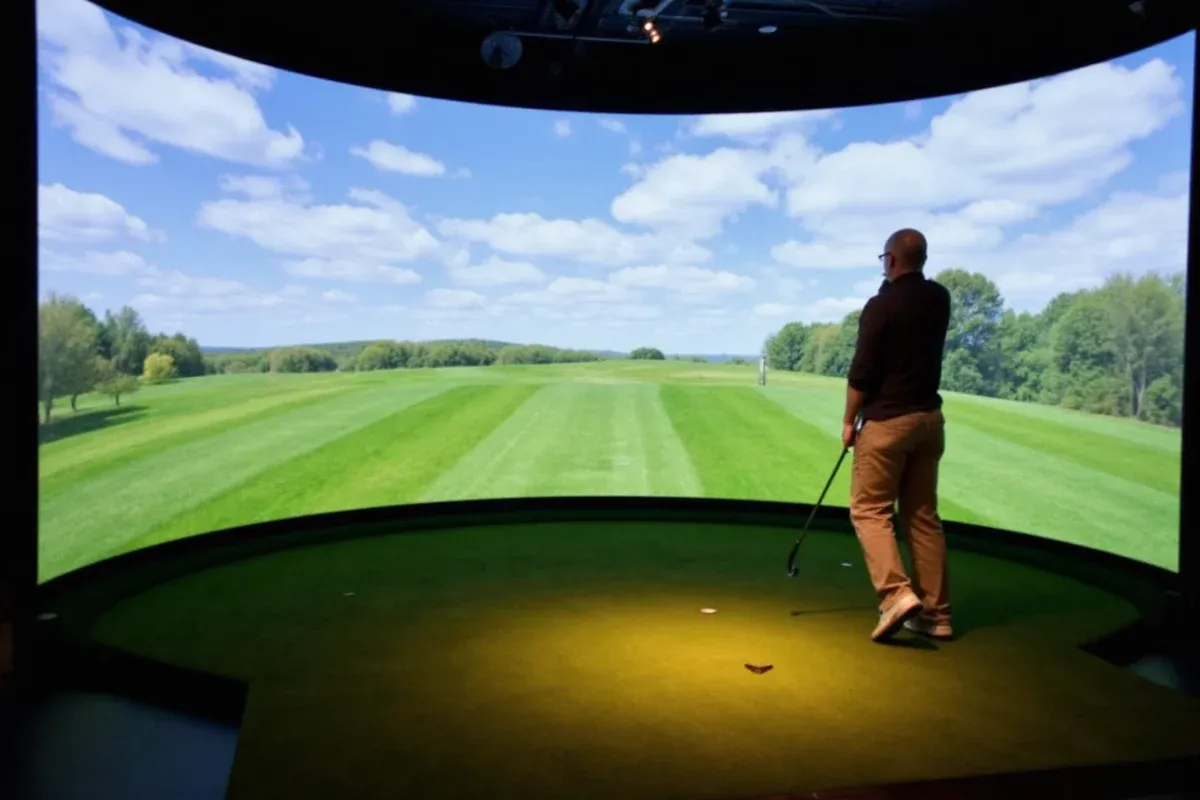
DIY Golf Simulator: Build Your Own at Home
Build Your Own Golf Simulator: A Complete DIY Guide
If you're asking whether you can build a do-it-yourself golf simulator, the answer is a definitive yes. With modern sensor technology, affordable launch monitors, and open-source software, creating a custom golf simulator at home is now accessible, cost-effective, and highly accurate for practice and entertainment.
Why Build a DIY Golf Simulator?
A homemade golf simulator allows golfers to train year-round regardless of weather, save on range fees, and track performance metrics with precision. Unlike commercial systems that can cost thousands, a DIY setup offers flexibility and scalability based on your budget and space.
- Significant cost savings compared to pre-built simulators
- Customizable to fit room dimensions and ceiling height
- Integration with popular simulation software like E6 Connect, The Golf Club (TGC), or Uneekor
- Ability to upgrade components over time
- Access to real-time data: ball speed, launch angle, spin rate, and club path
Essential Components of a DIY Golf Simulator
1. Launch Monitor or Sensor System
The core of any golf simulator is the device that captures swing and ball flight data. Options include radar-based systems (e.g., Rapsodo MLM, Mevo+) or camera-based solutions (e.g., SkyTrak, Uneekor).
2. Projector and Screen
You’ll need a high-lumen projector (minimum 3,000 lumens) and a durable impact screen. Ensure the throw distance matches your room size. Consider ambient light when choosing brightness.
3. Simulation Software
Software translates sensor data into realistic ball flight and course play. Popular choices:
- E6 Connect – professional-grade visuals and physics
- The Golf Club (TGC 2019) – modifiable courses and community content
- GSPro – supports multiple launch monitors and course libraries
4. Hitting Area and Net
A raised platform mimics tee conditions, while a net or enclosure absorbs impact. Use artificial turf with proper underlayment for durability.
5. Computer and Accessories
A dedicated PC with strong GPU performance ensures smooth simulation. Minimum specs: Intel i7 or Ryzen 7, 16GB RAM, NVIDIA GTX 1660 or better.
Step-by-Step Setup Guide
- Measure Your Space: Minimum recommended space is 10' W x 10' D x 8.5' H.
- Select Your Launch Monitor: Choose based on accuracy needs and compatibility.
- Install the Projector and Screen: Mount screen securely; position projector to avoid shadows.
- Set Up the PC and Software: Install drivers and sync with your launch monitor.
- Calibrate the System: Follow manufacturer guidelines for alignment and data accuracy.
- Test and Optimize: Hit sample shots and adjust lighting, angles, and settings as needed.
Cost Comparison: DIY vs. Commercial Simulators
| System Type | Average Cost (USD) | Accuracy Rating (out of 10) | Setup Time | Customization Level |
|---|---|---|---|---|
| DIY Golf Simulator | $1,200 - $2,500 | 8.5 | 6-12 hours | High |
| Foresight Sports GCQuad + Package | $6,000 - $8,000 | 9.8 | 2-4 hours | Low |
| TrackMan Range | $50,000+ | 10.0 | Professional install | None |
| SkyTrak Launch Monitor Only | $1,995 | 8.0 | 1 hour | Medium |
The data shows that DIY golf simulators offer over 85% of the performance of premium models at a fraction of the cost. While commercial systems like TrackMan deliver elite accuracy, most amateur players won’t notice the difference in daily training. DIY setups also allow modular upgrades, making them more future-proof than closed systems.
Tips for Maximizing Performance
- Use low-latency projectors to reduce input lag during gameplay
- Ensure consistent lighting to prevent interference with optical sensors
- Position the launch monitor according to manufacturer specs for best data capture
- Invest in sound-dampening materials if noise is a concern
- Regularly update software and firmware for improved compatibility
Common Questions About DIY Golf Simulators
Can I use my existing TV instead of a projector?
No, standard TVs are not suitable due to limited size and risk of damage from stray balls. Projectors paired with impact screens provide a safer, larger display ideal for simulators.
Is WiFi or Ethernet better for a golf simulator?
Ethernet is strongly recommended for stable, low-latency connections. WiFi can introduce lag or disconnections during gameplay, especially with high-bandwidth software like E6 Connect.
How much ceiling height do I need for a DIY golf simulator?
Minimum ceiling height is 8.5 feet, but 9–10 feet is ideal, especially for taller users or steep swing planes. This prevents headroom issues and improves sensor tracking.
Can I play real golf courses on a DIY simulator?
Yes, most simulation platforms like E6 and TGC feature licensed replicas of famous courses such as St Andrews, Pebble Beach, and Augusta National, using laser-scanned terrain data.
Do DIY golf simulators work for left-handed players?
Absolutely. All major launch monitors and software support left-handed mode, allowing accurate data tracking and course navigation just like right-handed setups.
More Articles
 Where to Watch NCAA Wrestling in 2025: TV & Streaming Guide
 How Many Super Bowl Wins Do the Chiefs Have? (2025)
 Coach with Most Super Bowl Wins: Bill Belichick's Legacy
 How Much Is a Ticket to the Masters Golf Tournament?
 How Many Pins Are in Bowling? (10-Pin Standard Explained)
 How Much Do Golf Caddies Make in 2025?
 Has Tyreek Hill Won a Super Bowl? Career Stats & Facts
 NFL Teams That Have Never Been to the Super Bowl
 Who Invented Ping Pong Table Tennis?
 Badminton For Full-Body Fitness: Science-Backed Benefits, Training Protocols, and Equipment Standards